The Heritage Provider Network wants to do for healthcare what technology in the film "Minority Report" did for police work.

In other words, it wants to use technology to pre-emptively predict when illness is likely to strike and take measures to prevent costly hospitalizations. This week Heritage announced that it was offering a prize of $3 million for any developer who successfully created a "breakthrough algorithm that uses available patient data, including health records and claims data, to predict and prevent unnecessary hospitalizations."
IF YOU LOVE ALGORITHMS: 15 genius algorithms that aren't boring

HPN says that the winning algorithm must be able to "identify patients who are at risk for hospital admissions" so that "healthcare providers can develop new care plans and strategies to reach patients before emergencies occur." All contest participants will be given access to data sets of anonymous patient data that will include outpatient encounter data, hospitalization encounter data, medication-dispensing claims data and outpatient laboratory data. From there, the contestants will be judged on how accurately their algorithm sorts data and correctly predicts the likelihood of future illnesses.

HPN says that it is holding the contest as part of a broader effort to cut medical expenses in the United States. HPN expects the competition will last for at least two years and it says that registration will be open for new participants throughout the competition.


Read More ...
0 comments
"Remote-controlled robots will be used at damaged Fukushima Daiichi facility."


The United States is sending specialized robots to Japan to help officials there get control of the Fukushima Daiichi nuclear power plants damaged in this month's devastating earthquake and tsunami.

Dr. Peter Lyons , an acting assistant secretary for nuclear energy with the Department of Energy, told a Senate panel on Tuesday that the government is shipping radiation-hardened robots to assist the Japanese. He said the robots could begin to give Japanese and U.S officials readings on the environment inside the nuclear power plants that were badly damaged during the 9.0 magnitude earthquake and the subsequent tsunami that rocked the nation on March. 11.

The robots could be sent into areas that would be dangerous for humans to enter because of high radiation levels.Lyons, speaking in front of the Senate Energy and Natural Resources Committee, did not specify how many robots are going, but did say they would arrive soon and are being sent at the request of the Japanese government.

"The government of Japan has been very, very interested in understanding the capabilities that could be brought to bear from this country," said Lyons. "We have provided that information. They have identified needs. We are moving expeditiously to ship not only the robots but also operators who perhaps will be used to train Japanese operators. We don't know yet how close the operators will need to be to the site."

When asked about getting information about the state of the damaged reactors, Lyons said the robots could provide some information. "Certainly not all we need, but some," he added.The robots aren't the only aid the U.S. is sending. Lyons said the Department of Energy has also sent 40 people to Japan, along with 17,000 pounds of equipment.

A little more than a week ago, Massachusetts-based iRobot shipped four remote-controlled robots to help the Japanese military with its daunting relief efforts. The company, which in the past has sent robots to aid rescue and cleanup efforts in the area affected by the Gulf of Mexico oil spill and at Ground Zero after the Sept. 11, 2001, terrorist attacks, also has six employees in Japan helping to train others to use the machines.

Tim Trainer, a vice president at iRobot, told Computerworld that the robots could be used for search-and-rescue missions, and there's a strong possibility that they will be sent into the damaged nuclear facilities.All four of iRobot's machines that have been sent to Japan are equipped with multiple cameras and can be operated from up to half a mile away. "People can stay at a safe distance and evaluate obstructions and the security and safety of a building," Trainer said.


Read More ...
0 comments
"European Commission staff told to change their passwords and to use only secure e-mail"

The European Commission, including the body's diplomatic arm, has been hit by what officials said Thursday was a serious cyberattack.The attack was first detected on Tuesday and Commission sources have said that it was sustained and targeted. 

External access to the Commission's e-mail and intranet has been suspended and staff have been told to change their passwords in order to prevent the "disclosure of unauthorised information," according to an internal memo to staff. Staff at the Commission, the European Union's executive and regulatory body, have also been told to send sensitive information via secure e-mail.

The event came just days ahead of the European Council summit being held on Thursday and Friday. The summit brings together the leaders of E.U. member states and crucial decisions will be made on economic strategy, the war in Libya and the future structure of the E.U.

This led to early speculation that the source of the attacks may be Libya, but the Commission was quick to rule this out. The attack is thought to be similar to the cyberattack on the French government in the run up to the G20 Summit in February 2010. That assault involved malware and targeted e-mail, with some of the related stolen information redirected to China. 

Commission administration spokesman Antony Gravili said officials would not speculate on the source of the attacks in such a sensitive security matter. He did, however, confirm that the attackers targeted the information of some Commission officials, in particular at the External Action Service, the body's foreign diplomatic arm.

"We are already taking urgent measures to tackle this. An inquiry's been launched. This isn't unusual as the Commission is frequently targeted," said Gravili. He added that there was no concrete evidence that the attack is linked to the E.U. summit.

Read More ...
0 comments
On Tuesday, Apple released a minor software update for the second-generation Apple TV.

According to the release notes, Apple TV Software Update 4.2.1 addresses issues that may cause the screen to flicker or display incorrect color on some older TVs, where the Apple TV may not wake up from sleep, and where audio may not be heard on some TV models after switching from another input.

The update comes less than two weeks after the major 4.2 update brought support for streaming sports content from MLB.TV and NBA League Pass, streaming audio and video from supported apps on devices running iOS 4.3, new slideshow themes, Dolby Digital 5.1 surround sound support for Netflix content, and an improved onscreen keyboard layout.

Source: Macworld
Read More ...
0 comments
There's a new version of the Firefox browser coming out this week, and it's so good you may want to adopt it instead of either Microsoft's IE or Google's Chrome. Indeed, I've already made the switch using an almost complete version of Firefox 4; the finished product will be ready to download on Tuesday, March 22.


Having said that, the three major browsers these days are all very good and it's a certain amount of trouble to switch; you've got to move your bookmarks and get used to a somewhat different environment. So when I say I'm moving back to Firefox, it's no slam against Chrome. (Microsoft's new IE 9 is getting good reviews, but I haven't had a chance to try it out.)

The main reason I like Firefox 4 so much is a feature called Panorama. Essentially it's a way of visually grouping tabs as if they are running in a separate instance of the browser, a real asset for inveterate multitaskers. In fact, a number of Firefox 4's tab-related features work much better than Chrome's. That may seem like a small point, but for me at least, tabs are a reflection of what I'm doing on the Web at any give time. I don't want them to get in my way.

Firefox 4 has a different look than earlier versions and it's somewhat cleaner, though unlike Google and other browsers it still maintains separate bars for navigation and search. Some elements have moved around to give Firefox a more svelte look, but it's still not as minimalist as Chrome - though I'd say thats altogether a matter of taste.

1. Panoroma
Say I'm working on a project about health care and have six or seven sites open that I'm using as references. At the same time, I like to have my Google calendar and contacts showing and maybe a news page. I'm also looking at material for a column on iPhone apps and that's another four tabs. Now I've got 14 or so tabs crowding the top of my screen and because the tabs are squeezed, it's hard to tell which is which. Very annoying.

Of course, I could stop and bookmark some of those pages, but if I'm really multitasking I like to have everything at my fingertips. I could also open another instance of the browser, but that takes time and eats up system resources such as memory.

With Panorama you click a small icon in the upper right hand corner that says "list all tabs" as you roll over it. When you enter the Tab Groups view for the first time, you'll see thumbnail previews of all of your tabs. To make a group, simply drag one tab out of the group and then drag a second one on top of it and so on. Firefox then draws a box around them. Then do another group. Like any other windows, they can be moved around and sized. You can also give them a name, say health care, iPhones and Info.

When you click on one of the boxes, you go back to your ordinary browser page, but only the tabs in the group you've selected are showing. Want to switch back? Simply click on the icon, and select the group you want to see and voila, you're working with it. Another helpful tab feature allows you to search for a tab. In the tab view simply start typing the name of the tab and Firefox will find it for you and highlight it.

2. Pin the tab on the browser
If you've used Chrome, you've probably familiar with the pin tabs feature, which is handy, but Firefox does it better, particularly for apps and add- ons. You pin a tab by right-clicking on it, and selecting, "pin." That tab, or app, is then represented by its icon on a corner of your screen. Unlike Chrome, in which the pinned material goes away when the session ends, Firefox apps remain pinned until you unpin them.

If you pin a page that changes, like Gmail or Twitter, the little icon will change color when that page has been updated. Very handy, though it does lend itself to getting distracted from the task at hand, a fault of the user not the browser.

3. Switch to tab
Finally, I want to mention one other feature called Switch to Tab. It's a little subtle but reduces clutter and drain on resources. Say I'm looking at the CIO home page for a while and then switch to something else.
If I've forgotten that I have CIO.com open and start to type the url again, Firefox will recognize it and ask me if I want to "switch" to that tab instead of opening it again. Smart.

As far as speed goes, I've seen a few benchmarks that say Firefox is now a bit faster than Chrome, but in the real world I'm not at all sure you'd notice the difference. Similarly, it appears that Chrome scores a little higher on some compatibility tests, but I'm not sure if that really matters.

In at least one important area, Chrome remains ahead: search. Because it is so closely integrated with Google's search engine, Chrome works better in that department, and makes it easier to add non-standard search engines to your repertoire.

The best news of all is that browser wars are back with a vengeance. All of the major vendors are conducting an arms race, doing their best to leapfrog the competition. In this battle for market share, we users keep getting a better product. How's that for a nice change?


Thank's for reading.,please leave a comment..

Source: CIO 


Read More ...
0 comments
With so many new browser releases coming out in such rapid succession, it stands to reason that at least some users are going to need some help figuring out which now works best for them.
Toward that end, I had a chat earlier today with Johnathan Nightingale, Mozilla's director of Firefox development, to get a sense of what the final release of Firefox 4 will bring. Here are some of the highlights of what we can expect.


1. More Speed
With its new JägerMonkey JavaScript engine, Firefox 4 delivers huge performance enhancements, Nightingale told me, including faster startup times, graphics rendering and page loads. In fact, in performance tests on the Kraken, SunSpider and V8 benchmarks, for example, Firefox 4 blew away previous versions of the browser, with performance results between three and six times better.Firefox 4 also outdid Chrome 10, Opera 11.1 and Internet Explorer 9 in the Kraken benchmark, as GigaOM recently noted. Bottom line: It's blazingly fast.

2. Less Clutter
 Tabs are now given top visual priority in Firefox 4 so as to enable more efficient and intuitive browsing. In addition to its new "tabs on top" layout, however, the software now also offers a number of other features to make it simpler and more streamlined.A Switch to Tab feature, for instance, helps reduce tab clutter by automatically calling up an already-tabbed URL rather than duplicating it all over again. "It took my tab list from 80 to 90 down to 50 or 60," Nightingale said.

"The slowest part of browsing is often the user," he explained. "If you have 200 tabs open and you can't find the right one, that's the slow part."Then, too, there are App Tabs, which allow the user to take sites they always have open--such as Gmail or Twitter--off the tab bar and give them a permanent home in the browser. Then, no matter where the user visits, those tabs are always visible on the browser's left-hand edge. Not only that, but each App Tab's icon glows to indicate when there's been activity on that site, such as new mail coming in.

When Firefox gets reloaded, it boosts loading speed by focusing first on the active page and App Tabs, and then loading other tabs in gradual succession after that, Nightingale explained.Further reducing clutter is Firefox 4's Firefox Button, meanwhile, which displays all menu items in a single button for easy access.

3. Panorama
 Though it began as an add-on, Firefox 4's new Panorama feature is another one designed to battle tab clutter. Using it, Web surfers can drag and drop their tabs into manageable groups that can be organized, named and arranged intuitively and visually.

In previous versions of the browser, users with 20 tabs, for example, didn't have an easy way to separate out the ones that were related. "Some people would put tabs in different windows, but that just moves the clutter," Nightingale explained.Panorama, on the other hand, now provides a visual canvas on which tabs can be logically organized into groups representing work, home, hobbies or research, for example.


4. Sync
Another new feature that started life as an add-on is Sync, which synchronizes an individual's multiple copies of Firefox across various platforms. So, a user might look up directions to a restaurant from their work computer, for example, and then be able to easily find and pull down those same directions from their Android phone on the road, Nightingale explained."Wherever you are, Firefox knows you," he added. "It gives you so much freedom."

For privacy, all such information is bundled on the user's local machine and encrypted before it goes onto the network, he added.


5. Do Not Track
With a single check box, Firefox 4 users can ensure that any time the browser requests a Web page, it will send along a header specifying that the user does not want their browsing behavior to be tracked.In theory, advertisers and Web sites could disregard such requests, Nightingale noted--as they could equivalent mechanisms in other browsers as well. On the other hand, enforcing them is not a technical problem, he noted. "It's a matter of trust--enforcing on the technical side doesn't help."

What Nightingale hopes is that advertisers and Web sites will use the new capability as an opportunity to show respect for consumers' wishes and to demonstrate leadership when it comes to privacy. In beta versions of the software, he noted, most wanted to learn more about how to comply and get involved."I'm keen to see how ad networks and content sites respond," Nightingale concluded. With the new technology enabled, "everyone you're interacting with knows your intent."


6. Under the Hood
A number of other features--some visible to users, others not--will also appear in Firefox 4, including support for the WebM format for HD-quality video; 3D graphics via WebGL; elegant animations through the use of CSS3; and multitouch support.Then, too, there's super-fast graphics acceleration with Direct2D and Direct3D on Windows, XRender on Linux, and OpenGL on Mac enabled by default on supported hardware.

7. Improved Security
With HTTP Strict Transport Security, or HSTS, sites can now make sure information is always encrypted, thereby preventing attackers from intercepting sensitive data. Previously, a hacker sitting in a Starbucks (SBUX) store, for example, could potentially watch Web surfers enter a bank's home page, which is not encrypted, and hijack them from there, Nightingale noted.

With Content Security Policy, or CSP, meanwhile, Firefox 4 ensures that cross-site scripting attacks can't infect a site such as through its comments section, he added.I should also note that because Firefox's code is open, it's not subject to any vendor's preset patch schedule. Rather, its security is constantly being reviewed and improved.

8. HTML5
Firefox 4's new HTML5 parser and full support for Web video, audio, drag & drop, and file handling mean that it's capable of supporting the latest Web environments.

9. Multiplatform Support
Whereas Microsoft's IE9 can be used only on Windows--and only Vista and Windows 7 at that--Firefox, as always, is multiplatform. So, whether you're on Windows, Linux or a Mac, you can enjoy its powerful new features.

10. The Community Touch
Last but not least, whereas proprietary browsers such as IE9 are developed by Microsoft's team of paid developers to reflect their own vision of what users want, Firefox has been shaped significantly by the people who use it. In fact, between 30 percent and 40 percent of its code was developed by the community, Nightingale told me. It's hard to imagine a better way to make sure a product delivers what users want.

With so many exciting new capabilities, Firefox users have a lot to look forward to in this new release. So, for that matter, do the legions of Internet Explorer users who will sooner or later make the switch

Thank's for reading.,please leave a comment..


Source: PCworld


Read More ...
0 comments
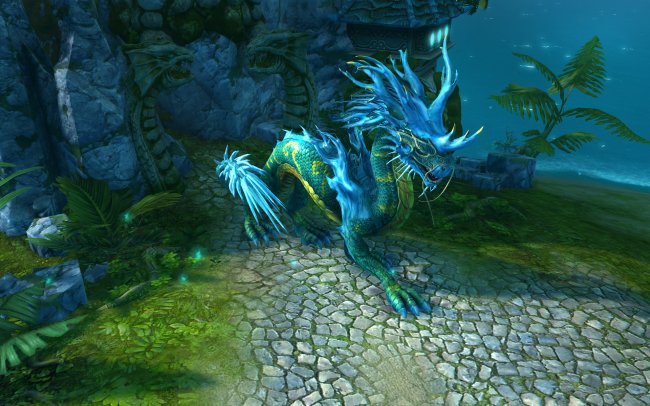
Might & Magic Heroes VI has been officially announced and it will be released for Microsoft Windows in 2011. It has been speculated that Heroes VI might hit the international markets sometime in March 2011. Might & Magic: Heroes VI will be developed by the Black Hole Entertainment and the publisher is Ubisoft. 

Heroes VI keeps its tradition alive and gamers will be happy to know that it remains a RPG and turn-based strategy game. In Might & Magic Heroes 6 the action happens after 400 years before the story in Heroes 5, which makes the Heroes 6 a prequel to Heroes 5. Also, for the Might & Magic Heroes VI it has been confirmed that it will have support for multiplayer gameplay.

New faction " The Sanctuary " also known as the Nagas. read detail here   


New details about the upcoming in the Might & Magic series should surface in the coming months. The details that everyone expects should contain an official release date, requirements, gameplay footage, screenshots and extensive details about new features that Heroes VI might be equipped with.


Read More ...
0 comments
Fedora is one of the best-known desktop Linux distros but there aren’t a whole lot of derivative distros based on it. Fusion 14 is a new distro that uses Fedora 14 as its base. Don’t be fooled though, Fusion is not your father’s Fedora at all. There’s more to it than meet’s the eye and it stands a pretty good chance of replacing generic Fedora for users who like the Fedora base but who prefer to have some value-added features that take it to another level.

If you aren’t familiar with Fedora 14 itself, please see the earlier review I wrote of it for DLR. KDE users may want to refer to the review of the KDE version of Fedora 14.
Here’s the official description of Fusion from the Fusion site:

Fusion Linux is a Fedora Remix that uses a combination of free and open-source, non-free and non-open-source firmware and software, to bring the user the most advanced experience on the Linux platform.

Fusion Linux includes an outstanding theme, multimedia functionality out of the box and added desktop tweaks for better usability.And finally, Fusion Linux is 100% compatible with Fedora.

What’s New In This Release
Here’s a sample of the new features in this release:
Custom theme
Post install welcome wizard
Multimedia support
More games
Skype removed
Better hardware compatibility
Mint menu
DockbarX
GNOME Do

The post install welcome script is a really nice touch in this distro. Once your install is finished and you reboot, a terminal window will open and you can configure your system. The script lets you update your system, install Skype, setup sudo, use Redshift, install Dropbox, or change your wallpaper. While it would be nice if it didn’t run in a terminal window, it’s still a useful tool for those who want to tweak things a bit before using Fusion. The desktop section of the review has images of the entire configuration process.

Enhanced multimedia support is always a welcome thing in any distro, as far as I’m concerned. Fusion gives you flash, MP3 and DivX support by default.The removal of Skype was done to facilitate free distribution of Fusion Linux. I don’t regard it as a big deal at all since the welcome script lets you put it back in with ease in seconds.

The inclusion of Linux Mint’s menu is welcome indeed. I know that some people don’t like it but I always have, so I never mind seeing it borrowed by other distros. It adds some extra value to any distro that uses it. I hope more distro developers will consider adding it to their offerings at some point.

Source: Linuxtoday

Read More ...
0 comments
When e-mail providers like Google came on the scene the amount of spam in our inboxes fell, not because there was less of it about, but because more intelligent measures were being taken to identify and block it. Levels of spam circulating the Internet always seem to be on the increase and new measures required to block it, but this week those levels fell dramatically.

The reason for the sudden fall was a coordinated attack on one of the most successful botnets out there called Rustock. Multiple servers used by the botnet were taken offline simultaneously on Wednesday crippling Rustock’s 26 command and control networks and therefore stopping them sending out around 30 billion spam messages every single day.

Those networks were thought to be controlling in the region of 815,000 Windows PCs around the world infected with Rustock’s rootkit and doing its dirty work. Unless those command networks can be brought back online, which nobody wants, those infected machines become useless to the spammers.

Security experts are seeing this as a major breakthrough in cutting down on levels of spam. Rustock remained prevalent due to a number of tactics it used to remain undetected making it very difficult to shutdown. Unless you cut off all its heads at once it will come back, and this time it looks as though it may hopefully remain offline.

While it is unknown who planned and coordinated this takedown of the botnet, everyone agrees that whoever did it certainly knew the botnet well and took measures to counteract any backup techniques Rustock used to re-establish itself and its connection with the infected Windows PCs.

Source: Geek
Read More ...
0 comments
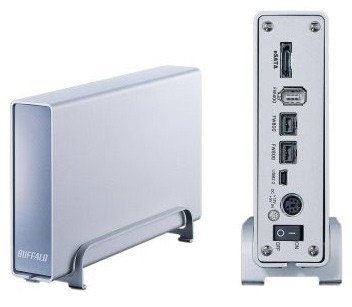
If running out of room to store your data is a concern for you, know that Western Digital aims to make that a thing of the past with its new My Book Studio Edition II.

This dual-drive storage system can be configured with capacities up to an enormous 6TB, ideal for those who need to work with high-quality files, such as HD video and photos. You'll be able to transfer those files at speed as well, thanks to the built-in eSATA and FireWire 800 ports--there's also a USB 2.0 port and an included FireWire-800-to-400 adapter for compatibility with a wide range of systems. The drive can also be set up as either a striped or mirrored RAID, depending on your needs.

You can pick up the My Book Studio Edition II in three different capacities: 2TB ($250), 4TB ($460), and 6TB ($550). All are formatted for Mac and compatible with Apple's Time Machine backup software. You'll need to be running at least Mac OS X 10.5.2 or greater or Mac OS X 10.6 or greater to use the 4TB and 6TB models (they also require Windows Vista and Windows 7, if you're going the PC route). The 2TB model is also compatible with Mac OS X 10.4 and Windows 2000/XP.

Source: Macworld
Read More ...
0 comments
"A space exploration first, NASA swings a spacecraft into orbit around innermost planet"

For the first time, a spacecraft is in orbit around the solar system's innermost planet. About 9 p.m. EDT Thursday, NASA's Messenger spacecraft maneuvered into orbit around Mercury. Carrying seven science instruments and built to withstand the blistering temperatures near the sun, Messenger is tasked with performing the first complete reconnaissance of the planet's geochemistry, geophysics, geologic history and atmosphere, according to NASA.

Messenger is programmed to get images of different areas of the planet, including its northern pole, where some scientists surmise there might be ice . That would be a major discovery on a planet that is so close to the sun that its surface is 11 times brighter than Earth's.

"From the outset of this mission, our goal has been to gather the first global observations of Mercury from orbit," said Messenger's principal investigator Sean Solomon and director of the Department of Terrestrial Magnetism at the Carnegie Institution of Washington. "At the time of our launch more than six and a half years ago, that goal seemed but a distant dream. Messenger is now poised to turn that dream into reality."

Now that the spacecraft is in orbit, NASA engineers will begin checking Messenger's systems to make sure they are in working order.Starting on Wednesday, the spacecraft's instruments will be turned on and checked out, and on April 4 the mission's primary science phase is set to begin.When Messenger entered Mercury's orbit, it was 28.67 million miles from the sun and 96.35 million miles from Earth.

Messenger has been on a six-year mission to become the first spacecraft to orbit Mercury. NASA reported that it followed a path through the inner solar system, including one flyby of Earth, two of Venus, and three of Mercury.

Messenger hasn't been scientifically idle during its journey to enter Mercury's orbit.During its second flyby of Mercury in the fall of 2008, Messenger sent back more than 1,200 images of the planet's surface , along with topographical information and data about its atmosphere and magnetic fields.

"The region of Mercury's surface that we viewed at close range for the first time this month is bigger than the land area of South America," Solomon said after the second flyby. "When combined with data from our first flyby and from Mariner 10, our latest coverage means that we have now seen about 95% of the planet."

NASA's Messenger is the first spacecraft to return information about Mercury to Earth since the Mariner 10 mission more than 30 years ago.The space agency's Mariner 10 was the first spacecraft to reach Mercury and Venus. Mariner 10 flew by Mercury three times, returning images and data from the planet.

The scientists behind Messenger hope to take this latest mission several steps further. Data from Messenger will be collected by Deep Space Network antennas and transferred to the Mission Operations Center at the Johns Hopkins University Applied Physics Laboratory in Laurel, Md., where it will be analyzed.

NASA scientists and engineers have spent about 20 years developing new materials and technologies for Messenger. Its structure was built out of a graphite epoxy material that was designed to be strong enough to withstand the launch yet light enough to lower the probe's overall mass and save on energy usage. Two large solar panels and a nickel-hydrogen battery power the spacecraft.

The Messenger uses two computer chips -- a 25 MHz main processor and a 10 MHz backup processor.
The spacecraft, according to documents on NASA's Web site, includes a gamma ray and neutron spectrometer that is designed to map different elements and offer clues about the existence of ice at the planet's poles. A magnetometer attached to a nearly 12-foot boom will scan the planet for areas of magnetized rocks. Dual-imaging cameras, one with a wide-angle imager and one with a narrow-angle imager, will map the surface and give scientists a topographical view.


Read More ...
0 comments
"

Starring:
  • Aaron Eckhart Staff Sergeant Michael Nantz
  • Michelle Rodriguez as Techincal Sergeant Elena Santos
  • Will Rothhaar as Corporal Lee Imlay
  • Shaffer "Ne-Yo" Smith as Corporal Kevin Harris
  • Michael Penya as Joe Rincon
  • Ramon Rodriguez as 2nd Lieutenant William Martinez
Story: A Marine platoon faces off against an alien invasion in Los Angeles.

Trivia: Very little of the film was actually shot in Los Angeles. Tax incentives brought the production to Louisiana where sets of Los Angeles streets were constructed.

Battle: Los Angeles comes from director Jonathan Liebesman, who was behind the helm for such awful horror films as Darkness Falls and The Texas Chainsaw Massacre: The Beginning. This action/sci-fi/war film is a little bigger in scope than anything he's worked with before, and when looking at his resume you wonder why someone relatively unproven would get the job. But Liebesman is the least of this film's problems, which keep it from being epic and instead just a run of the mill sci-fi movie that should quickly be forgotten.

Aaron Eckhart stars as Staff Sergeant Michael Nantz. He's retiring after losing all of his men in a previous mission. How or why is never explained, because this would provide drama about if he is fit to lead against the alien invaders. This film is too busy with special effects and explosions to build up any of their characters, which is fine in some cases but you need at least one strong character to gravitate towards or the audience stops caring. Eckhart's character is the only one with any kind of build, and it's mostly that he had a bad incident in his last mission, but he's going to be a hero now.

That's the problem in general. The script is really lacking. Nothing is explained, nothing is given any real time to develop. It's just set piece after set piece, action sequence after action sequence. Any time we may get some real character development that's moved aside for another alien attack. So outside of Eckhart, who someone manages to make his character watchable by sheer will alone, everyone else is mostly stock. You have your minorities, your token "tough woman" character and even a rookie that speaks like he's, yes, from the country. It's paint-by-numbers and incredibly lazy writing. Sure, the actors are decent in their roles, but they really don't have enough to do outside of fire a gun and yell a lot.

That's the biggest complaint with the entire script: lazy. The filmmakers put a lot of effort into the special effects (which were decent, but not as good as you'd expect) and the aliens (which look laughable) rather than focus on the human characters and the fight for survival. A sci-fi war movie is not hard to do. Even if it's not Aliens or Starship Troopers, you can still put something watchable together. Battle: Los Angeles is a mess. It's full of tired war cliches mixed with tired alien invasion cliches. The ending is ripping almost en masse from Independence Day.

There are no interesting characters, the plot itself is very basic and there is not a single interesting line of dialogue. I can guarantee you've heard many of the things these people will say from other, better films. If one were so inclined, you could probably predict what a character was going to say before they say it. That's if any of the side characters manage to get more than a line or two per scene. They're mostly there as cannon fodder so Aaron Eckhart's character can solve all of the problems and save the day. If you wanted to make it a "one man saves the world" picture, then do that. Don't put it in the disguise of a ensemble piece and then refuse to flesh out any of your main characters.

But this isn't the worst of it's genre. There are some good points. The combat scenes are fairly decent. This movie doesn't have the usual "blurred camera" cinematography on the fighting scenes that other films like Transformers and even The Dark Knight like to use. You can actually see a majority of what's going on, which is a plus. The aliens look bad, but their ships are unique. They're actually something of a callback to the old "flying saucers" days with some of the drone groups.

Battle: Los Angeles would make a great video game. I was thinking that as a bonus level of something like Call of Duty I could find myself really enjoying playing it. But even Call of Duty has a better written story and developed characters. For all of this movie's story, you might as well be playing Bad Dudes for the NES.

Source: IMDB 
Read More ...
0 comments
"After years of discussion, the .xxx domain space is finally coming to the porn world."


The adult entertainment industry now has a home on the Internet: It's called .xxx.The group that manages the Internet's top-level domains -- the .com, .org and .net that we all type at the end of e-mail messages and Web addresses -- said Friday that it will establish a .xxx domain, a move that it hopes will add a measure of predictability and security to the wild world of Internet websites. 

The Internet Corporation for Assigned Names and Numbers (ICANN) signed off on the process at a meeting in San Francisco this week.Pornography is often used to lure Web surfers to dangerous or fraudulent sites. By regulating .xxx, ICANN hopes to make things better. 

Anyone who wants to register a .xxx domain will first have to go through an application process that's approved by the International Foundation for Online Responsibility. This procedure is intended to ensure that .xxx domains don't engage in fraud, child pornography and other practices. At the same time, having a domain set aside specifically for adult websites would make it easier for users to block such sites from their browsing experience. 

The move gives consumers "reassurance they are more protected from the risk of viruses, identity theft, credit card fraud and inadvertent exposure to child abuse images," ICANN said Friday in a statement announcing the decision.However, critics say established porn sites are unlikely to give up their .com domains just because there's a .xxx option. That means anyone who thinks he's filtered porn by filtering out all .xxx domains from his network is due for a nasty surprise. In addition, porn site operators won't be forced to get .xxx domain names and go through the vetting process. 

ICANN has been toying with the idea of introducing .xxx for about a decade. The board had approved the new top-level domain in June, but now the decision is final.Longtime .xxx proponent ICM Registry will be the .xxx registrar. The company says it has received applications to pre-register more than 200,000 .xxx domains.

Read More ...
0 comments
When the iPad 2 hit Apple stores, people couldn't wait to buy. Lines stretched around entire city blocks. At the Apple Store in Walnut Creek, Calif., a shopping mecca 30 miles east of San Francisco, people at the front of the line said they'd been waiting since 6 a.m. for the iPad 2 to go on sale at 5 p.m.

Imagine the kind of pressure that executives toting original iPads are now exerting on IT departments to upgrade to the iPad 2.Jeff Letasse, VP of IT for Conceptus, a Silicon Valley medical device manufacturer, says that pressure isn't all bad news. In fact, he says the Apple upgrade cycle has some advantages over the old PC refresh cycle. Despite the fact that iPad 2's features haven't wowed him, he's already ordered 30 iPad 2 3G devices for top sales executives.

Here's the back story:
Conceptus began replacing laptops with iPads for its salespeople late last year. IT staff also use iPads for training purposes and remote access. Some 220 iPads are dispersed in the workforce. (See Why One Company is Ditching Sales Laptops for iPads.)

With an iPad in their hands, salespeople show presentations to doctors and use a custom enterprise iPad app that taps into a back-end CRM system. Conceptus is also moving toward using a Citrix iPad app to give users a Windows desktop in a virtualized environment."They have to be able to do everything on their iPad," says Eric Simmons, Conceptus director of IT operations and ERP solutions.

[ What happens when a CEO gives iPads to all? | Check out 3 must-have iPad productivity tools, reports CIO.com. ]

iPad Peer Pressure
The iPad's burgeoning status as the presentation tool of choice has resulted in many C-level executives demanding iPads at work, not just at Conceptus but across a variety of industries. These execs can pressure enterprise IT departments to upgrade to new models ASAP.

Letasse is fully aware of this pressure, but he says the lifecycle of the iPad actually benefits companies. With PCs, Conceptus was on a three-year cycle. This caused not only technical problems with older and newer models, he says, but also "a little PC envy." No one wants to be the exec still stuck with the old PC. With iPads, he expects Apple to come out with a new model every nine to 12 months. He's hoping to refresh iPads every two years--much like a cell phone.

"The wait time isn't as long as it used to be with a laptop," Letasse says.So why buy 30 shiny, new iPad 2s for senior executives who've only had their original iPads for a few months? Answer: Conceptus is growing its sales force over the next couple of quarters and needs to give iPads to new recruits. Of course, they'll be getting hand-me-downs.

"Otherwise, to be honest, we wouldn't be buying the devices," Letasse says.

iPad 2's Top Selling Point: Picture Perfect Projection
 That's not to say the iPad 2 doesn't bring anything new to the table. Everyone from sales to legal to the IT staff is excited about the iPad 2's video-mirroring feature that lets users mirror the iPad 2's entire screen on an external high-def display, he says.

One of the drawbacks of the original iPad is the inability to do this, Letasse says. While the video-mirroring feature comes in the newly released iOS 4.3, only the iPad 2 supports it. Using a Digital AV Adapter from Apple ($39) that plugs into the iPad 2's docking connector port, users can mirror the iPad 2's display on an HDTV or any video projector using an HDMI cable. The iPad 2 can output video at up to 1080p resolution.
Along with the iPad 2 order, Conceptus purchased 50 Digital AV Adapters.

Charles Edge, author of Enterprise iPhone and iPad Administrator's Guide and director of technology at IT consultancy 318, is quick to point out that HDMI projectors aren't all that common today compared to VGA-based projectors. But HDMI video does set up the iPad 2 nicely down the road. "Our customers see iPad as the presentation tool of the future," he told CIO.com.

Letasse says senior salespeople make the most presentations, which is why they'll be getting the iPad 2s. He also plans to use the high-def video mirroring feature during his training sessions and demos. "The ability to project is a biggie for all of our iPad users," he says.


FaceTime Face-Off
 When word got out that the iPad 2 would have a front-facing camera, industry watchers predicted enterprises could also take advantage of video chat. Apple's FaceTime software enables video chat between Apple devices (iPhone 4, iPad 2, Macs) over Wi-Fi, not 3G.

"FaceTime will be appealing to a lot of enterprises that may look at it as easy, entry-level video teleconferencing," Dan Hays, partner at management consulting firm PRTM, which focuses on operational strategy and execution for C-level executives within Fortune 2000 organizations, told CIO.com.
But that wasn't the case at Conceptus."There really isn't a reason for our salespeople to use FaceTime," Letasse says. "I tried FaceTime with my daughter at the opposite ends of our house. But as soon as she saw me on it, she said, 'This is kinda creepy, I don't really care for this.'"

That creepy FaceTime feeling doesn't just come from young people, either. Letasse used FaceTime with another executive at Conceptus recently, and after the novelty wore off in the first minute both men just couldn't see the point. "I didn't want to keep looking at him," he says.

Video calls, though, do come in handy when communicating with offshore partners, especially if there is a language barrier to overcome. While these opportunities aren't common, video chat can go a long way. "There's a level of humanizing with the other group," Simmons says.

Source :CIO

 
Read More ...
0 comments
"Get Them and use them, ten pieces have been scattered all around "

Abyssal Armor is a set of armor that can be found in Darksiders which is much stronger than War's regular armour and gives life upon all attacks, like a stronger version of Bloodthirst . The Abyssal Armor is broken into ten pieces which have been scattered all around you as you face the Destroyed City - gathering them all and forging the abyssal armor is not essential to completing the game, but presents an additional challenge for players wishing to play more content. Please note that Abyssal Armor is not the same as the original design for War's armor. Also it should be noted that if you manage to collect all 10 pieces during your first time through you are given the option, when starting a new game, to use the full set of armor right off the bat. Should you choose this option.

Locations:
  • Twilight Cathedral: After you collect the three holes swords and raising the circular platform up out of the floor (where you access the door to the end boss) turn around and hop up the pushable block onto the balcony. To the left is a door with one of those grabbing creatures above it. Use your shiny new Crossblade to stun it and run through the door to claim the armour piece and some other toys. 

  • Scalding Gallows: As you leave the library, on the right hand side you will see a platform you cannot reach. On one of the pillars of this platform there is a red growth with a bomb conveniently attached to the growth. Throw a car, or any other object, at the bomb, and the explosion will cause the pillar to fall, allowing you to reach that platform. You can also use your Crossblade, but the car is probably easier, so you get the piece right when you get there. 

  • Scalding Gallows: Standing by the Vulgrim location and looking over at Samael's prison you will see a small path below just above the lava. Jump down and delay the double jump, then glide forward against the wall until Shadowflight deactivates. Follow the path up to chest, then jump out and use the Shadowflight point to get back up.

  • Drowned Pass: Before doing the shadow challenges (or afterwards if you miss it) dive underwater near the entrance to this area (to the left) to find the armour piece in one of the caves. You actually go to this cave during the shadow challenges but you can't open chests in the real world while in the shadow realm
  • Drowned Pass: After completing all shadow challenges you'll get this given to you by the Tormented Gate at the end. 

  • The Hollow: As you progress through this level you will be in a tunnel where a giant (rideable) demon smashes through the right wall to attack you. The armour piece is in the hole it left. 

  • Silitha's Loom: After fighting the first Loom Warden you'll find yourself in a room with a chronosphere and a grapple point (red) above it. Grapple up to find the armour. 

  • The Black Throne: In the third tower you will come across some red crystals (bomb them) destroy them to find your armour. 

  • Ashlands: Ride to the cliff, east of the three connected mining towers in the Ashlands, to find a shadow flight point. Up here is a Soldier artifact and some grapple points (red) use these to get onto the roof of the drilling tower and claim your final armour piece. 

  • Eden: On the way towards the Tree of Knowledge run out into the lake area(This lake area where the armor fragment is located behind a waterfall. So search thoroughly) and search to find a piece of armour, a wrath shard and some other items. If you missed these the game is fibbing when it says you can't go back, the portal next to Azrael in Leviathan's Drift takes you back here.
 
 See Video above for Abyssal location
Read More ...
0 comments
"Ezio heads to Rome to take down the Borgia family once and for all."

Brotherhood, on the other hand, will have a slightly harder time proving its worth. Rather than moving to a new time period, it continues directly on from the events of Assassin's Creed II, only with the action shifting almost entirely to Rome. Like previous titles, there's also a modern-day component. The game is once again framed by the on-going battle between the Templars and Assassins, and players are actually assuming the role of Desmond, who lives in the present day and is able to experience the memories of his ancestor Ezio using a device called the animus. The game cuts between the two time periods but the bulk of the gameplay occurs in renaissance Rome.

Ubisoft Montreal has stressed that Brotherhood has a number of innovations and evolutions designed to keep the experience fresh, and we can certainly tell you that there's easily as much content here as in Assassin's Creed II, but will it be enough to really help this title distinguish itself from the series' last stellar outing? Let's find out.

After confronting Rodrigo Borgia and having his mind blown far beneath the Vatican at the end of Assassin's Creed II (and no, that's not a euphemism), the story picks up with Ezio ready for some well-earned R&R. It's not to be. Cesare Borgia – Rodrigo Borgia's son – is ticked off, and mounts a full scale attack on the assassins. The villa in Monteriggioni is destroyed and Ezio loses everything. Yes, after 20+ hours working towards all that bad-ass armour and weaponry, it's lost in a moment and players must begin again. Such is the fickle nature of video games. 

In any case, Ezio travels to Rome determined to take his revenge against Cesare. The city is divided into 12 districts, each of which is overseen by a Borgia tower, representing the Borgia family's control of the area. As long as the tower stands, soldiers are out in force, shops remain closed and the people oppressed.  

Assassinate the tower's Captain and burn it to the ground, however, and the area will open up for business. Ezio is then able to renovate blacksmiths, banks, stables and more, and these all add to his income, in much the same way renovatin.

Monteriggioni did in Assassin's Creed II. The more shops that are open, the more items will be available and perks Ezio will get. For instance, the more tailors you have, the more pouches for carrying knives and other items will be available, whereas the more banks are open the more money Ezio can store before his account is full. Each defeated tower also opens up an assassin apprentice slot, but more on that later.

It's important to note that while the Borgia towers are a key element of the game's structure, they're not actually central to taking down Cesare. You can actually finish Brotherhood without destroying all the towers. Instead, they're about earning income, unlocking items, gaining apprentice assassins and reducing the presence of Borgia guards across the city. By destroying a tower, players can make missions in that region easier for themselves by ensuring there'll be less guards around.

How to get to each Captain? Well, that's up to you. Each tower is surrounded by a compound where the guards are on high alert, so it's up to players to work out the best path to the Captain. Easier compounds allow astute players to clinically execute the Captain with little-to-no danger, while more difficult ones will inevitably result in a huge confrontation, or have a more difficult path to the end goal.

Leonardo da Vinci is back as an ally too, and once again provides weapons for Ezio. Turns out he's also been pressured into creating war machines for Cesare, so it's up to Ezio to destroy the plans and prototypes. These see you wielding a chain gun mounted to a horse and cart, piloting a boat with a naval cannon, gliding about in Leo's paraglider – modified to fire bombs, and manning a renaissance-era tank. They're not actually that exciting, but at least inject a little variety into the gameplay. 


Minimum Configuration:
SUPPORTED OS: Windows XP (32-64 bits) /Windows Vista (32-64 bits)/Windows 7 (32-64 bits)
Processor: Intel Core 2 Duo 1.8 GHZ or AMD Athlon X2 64 2.4GHZ
RAM: 1.5 GB Windows XP / 2 GB Windows Vista - Windows 7
Video Card: 256 MB DirectX 9.0–compliant card with Shader Model 3.0 or higher (see supported list)
Sound Card: DirectX 9.0 –compliant sound card
DirectX Version: DirectX 9.0
DVD-ROM: DVD-ROM dual-layer drive
Hard Drive Space: 8 GB
Peripherals Supported: Keyboard, mouse, optional controller


Recommended Configuration:
Processor: Intel Core 2 Duo E6700 2.6 GHz or AMD Athlon 64 X2 6000+ or better
Video Card: GeForce 8800 GT or ATI Radeon HD 4700 or better
Sound: 5.1 sound card
Peripherals: Keyboard, mouse, joystick optional (Xbox 360 Controller for Windows recommended)
Supported Video Cards at Time of Release:
ATI RADEON X1950, HD 2000/3000/4000/5000 series
NVIDIA GeForce 7/8/9/100/200 series 

* This product does not support Windows 98/ME/2000/NT


Source: IGN
Read More ...
0 comments
"The closures are part of a Chinese government crackdown on illegal Internet cafes in the country."

China shut down more than 130,000 illegal Internet cafes in the country over a six year period, as part of crackdown to control the market, according to a new Chinese government report.Internet cafes in China are highly regulated by the government, which can issue and revoke their licenses. 

Authorities have made it illegal for Internet cafes to serve minors under the age of 18, stating that the Web's content could endanger their well-being.Last April, the Ministry of Culture issued new rules declaring that Internet cafes would be closed down if they were found admitting minors. 

The Ministry of Culture said it will make the report public in a month's time. But in statements made to China's official Xinhua News Agency, the ministry said it is continuing to promote Internet cafe chains, while enforcing rules to stop the establishment of independently run Internet cafes. The ministry also plans on instituting harsher penalties for Internet cafes found admitting minors. 

"Promoting Internet cafe chains allows the government to have more control," said Yu Yi, an analyst with Beijing-based research firm Analysys International. "The Internet cafe chains all adhere to the same standards on service and security."

Around a third of China's Internet population surfs the Web from Internet cafes. The Ministry of Culture said the number of Internet cafe users in China reached 163 million in 2010. The country's total Internet population stands at 457 million users.There are currently 144,000 Internet cafes in China, according to the ministry, and close to 30 percent of them are operated by chain businesses.China has invested heavily in systems to control how users access information on the Web. 

Sites or content deemed too politically sensitive are blocked or taken down by government censors. This has included topics relating to the "Jasmine Revolution", a term an anonymous group of activists has been using in the last several weeks to urge the Chinese people to protest the government. Authorities have responded by preventing microblog searches on the term, as well as by arresting Chinese activists and deploying police patrols in cities across the country.
Despite efforts aimed at closing down Internet cafes, the number of people using Internet cafes to access the Web increased by 28 million people in 2010, according to the ministry. The rising total appears to be at odds with the closures, but over the past six years more legal Internet cafes have entered the market, Yu said. The ministry's report also does not say if some of the illegal cafes that were closed later reopened.
About half of the people who use Internet cafes in China are 18 to 25 years old, according to Analysys International. Nine percent of the users are under the age of 18. At the same time, 60 percent of the users have monthly incomes at 3000 yuan (US$456) and under.

China has the world's largest Internet cafe market, said Yu. "The leadership has been trying to regulate it for some time now," he said. China is actively closing down Internet cafes that don't meet regulations in an effort to standardize the way they operate, he added.


Read More ...
0 comments
"Wraps up year-plus cycle, calls current RC suitable as final code."

Mozilla on Wednesday announced it would ship the final version of Firefox 4 on March 22.The upgrade will be available for downloading at approximately 7:00 a.m. PT next Tuesday.

Originally scheduled to ship last November, Firefox 4 will wrap up a development cycle that started in February 2010 with several developer previews, but began in earnest last July when Mozilla released the first of what would eventually be a dozen betas.

Wednesday, Mozilla developers called the current Release Candidate, or RC build of the browser , good enough to ship as the final. Traditionally, it has run through multiple release candidates before settling on the latest as the shipping code. More than a year ago, for example, Mozilla issued two release candidates of Firefox 3.6.

"Today's triage session concluded with all systems go for a Firefox 4 launch on March 22," said Damon Sicore, Mozilla's senior director of platform engineering, in a message on a company forum .Mozilla CEO Gary Kovacs congratulated the troops on the same forum.

"We set a goal in December, we stressed toward the goal. At times, many thought we, I, us, were crazy, or too aggressive ... but in the end, we were able to get it done in March," Kovacs said.Firefox 4 will reach users eight days after Microsoft issued Internet Explorer 9 (IE9).

Before it began cranking out Firefox 4 betas, Mozilla had set an aggressive schedule that was to end with a final edition no later than November 2010. Last October, however, the open-source developer admitted it had underestimated several bugs, and said it was delaying the release until 2011.

Firefox 4 features a new tab manager, dubbed "Panorama," supports GPU acceleration to boost page composition speeds, and boasts an overhauled interface that resembles Chrome's and IE9's minimalist designs.Mozilla is already prepping for the next version of Firefox. According to plans now circulating among developers, the company is considering an ambitious schedule that will ship a major upgrade every three or four months.

Firefox 4 is Mozilla's best shot at reclaiming some of the browser usage share it's lost in the last year. Recent statistics from Web analytics company Net Applications had Firefox's share at 21.7% in February, down from 24.5% 12 months before.Anyone running Firefox 3.5 or 3.6 can grab the upgrade March 22 by selecting "Check for updates" from the Help menu. Users running Firefox 4 RC, however, won't need to download anything next week because Mozilla deemed that build identical to the final.


Read More ...
0 comments
"The next version of Java Enterprise Edition will focus on cloud computing"

The specification for the next version of Java Enterprise Edition has been approved unanimously, according to a posting on the Java Community Process website.Oracle submitted the spec for Java EE 7, which will focus on improvements for cloud computing, among other areas. 

Twelve of the Executive Committee for Java SE/EE's 13 members voted "yes with no comment." Those members include Google, VMware, Intel, SAP, Hewlett-Packard and Fujitsu, among others.Only IBM weighed in, saying there's an opportunity to design Java EE 7 "to address market dynamics which are increasingly looking for simpler and more agile technologies and solutions."

"Agility requires dynamic extensibility of the platform, and that extensibility requires modularity be a fundamental underpinning of the platform," it added. "IBM believes this should be based on Java SE 8 modularity providing the foundation for smaller, more agile deployments of Java EE."

Java should embrace cloud standards, according to IBM. "However this must be grounded on existing IT & SOA standards and customer use cases. We need to enable the technology to evolve naturally without locking our customers into early solutions that are likely to require significant change in the future," it stated.

Big Blue also supports licensing models that enable third parties to create independent implementations of Java Specifications "and that do not allow individuals or companies to exercise unnecessary control for proprietary advantage," it added.


Read More ...
0 comments
Like its processor, the new game picks up in 16th century Japan during the aftermath of the Onin War. The battles between rival Shoguns have devastated the country and left the capital of Kyoto in ruins. Competing warlords in control of small pockets of power are each striving to obtain the blessing of the central emperor and legitimize their rule of the entire land. The player takes on the role of one of eight of these warlords, each with a unique starting position and different political and military strengths. Some may be located on remote islands that are rich in resources but far from opportunities. Others might be in the thick of the action immediately and able to use unique samurai units to carve out a more secure portion.

 As a setting, feudal Japan satisfies all the Total War requirements. It's a period with lots of competitors who all have an equal chance of coming out on top. It's a period of rapid political and technological change, thanks in no small part to the Dutch and Portuguese bringing gunpowder to the island. Finally, the samurai who dominate this period offer a perfect blend of the best parts of fantasy and reality. 

After the excesses of Empire, Shogun 2 is taking a Zen approach. Though the word "accessible" is often code for "plain," in the case of Shogun 2, it's clear that the designers want to maintain a tighter focus on the core elements and not give in to feature creep. The unit roster is a great example of this. Rather than massive roster of units found in Empire, Shogun sticks with just 30-40 basic units (20 or so per faction), each of which has a clear and obvious purpose. This should give the player a chance to focus more on tactics than on the slight variations between similar unit types. If you need to keep an enemy at bay, for instance, you'll know to call on your Ashigaru spearman. To help add a bit of variety, units will upgrade over time.  

The scale is also different in terms of the presentation of the story. Empire was a game about a global war. Shogun 2 is about eight warring fiefdoms. So if Shogun 2 won't have the epic geographic scale of Empire, it will have to compensate by emphasizing character and story. During its time in Europe (through Medieval, Rome and Empire), Total War has gradually shed some of the narrative that provided context for the battles and campaigns. Shogun 2 will focus directly on the daimyo, or clan leaders, like Takeda Shingun or Chosokabe Motochika. Instead of being the impersonal force guiding the destiny of your faction, you'll actually play as a person who has to negotiate the treacheries and loyalties of family politics, which can sometimes be as deadly a battlefield as any you can find. Your generals will also be more important this time around, not just due to the return of their pre-battle speeches, but also because you can choose which upgrades they get as they develop. It makes it much easier to get attached to them than the sometimes random characters you've recruited in previous Total War games.


One particularly novel development is the introduction of hero units. These are warriors who have perfected a fighting art and can carve their way through enemy armies without much trouble at all. Based on mythologized historical figures like the warrior monk Benkei, hero units are a nearly unstoppable force on the battlefield, capable of holding bridge crossings against entire armies, or smashing through a battle line to engage the enemy general. You can counter heroes with the right tactics, such as filling them full of arrows, or by having your own hero units engage them in duels. The development team may even consider letting players use political manipulation to sway heroes away from each other. 

The unique nature of Asian architecture has a profound impact on sieges. The stacked pagoda structures of Japan allow sieges to play out in stages, with attackers and defenders moving from wall to wall and from tower to tower. This gives both sides of a battle more options than simply waiting for a hole to appear in the outer defenses and then just cramming as many men as possible around it. Each castle will have five levels of construction as well, so there's an increasing level of choice and sophistication as you advance. What's even more intriguing is the team's suggestion that castles will have unique qualities based on whether they're built in the mountains, on the plains, or by the sea.

Even with all the new siege mechanics, Creative Assembly is striving to ensure that the game delivers the full range of battle types, from small scale ambushes and river crossings to huge battles in open fields. The hilly nature of Japan means chokepoints abound, so players will have to consider maneuver and position very carefully as they make their way towards objectives.

Minimum Specs (Required for playing Total War: Shogun 2):
  • 2 GHz Intel Dual Core processor / 2.6 GHz Intel Single Core processor , or AMD equivalent (with SSE2)
  • 1GB RAM (XP), 2GB RAM (Vista / Windows7)
  • 256 MB DirectX 9.0c compatible graphics card (shader model 3)
  • 1024×768 minimum screen resolution
  • 20GB free hard disk space

Recommended Specs (Recommended for optimum game play of Total War: Shogun 2):
  • 2nd Generation Intel® Core™i5 processor (or greater), or AMD equivalent
  • 2GB RAM (XP), 4GB RAM (Vista / Windows7)
  • AMD Radeon HD 5000 and 6000 series graphics cards or equivalent DirectX 11 compatible graphics card
  • 1280×1024 minimum screen resolution
  • 20GB free hard disk space

Source: IGN
Read More ...
0 comments